-
Dining in style
Dec 30, 2011
-
4 min read
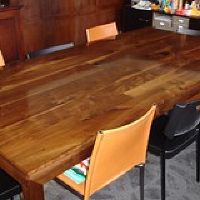 Earlier this year, I volunteered to host Christmas festivities for my immediate family, which meant that we’d have eight to ten people over for dinner. The dining table was still the same one I had purchased on clearance years ago for my 1-bedroom house. It had served me well over the years, but it could only comfortably seat four, with six as the absolute maximum. Plus, with a rather large dining room (around 12' x 15'), it was underwhelmed by the scale of the room.
 -
Honing in
Sep 16, 2011
-
5 min read
 I’m pleased to report that the second of my shop projects is nearing completion. I use water stones for sharpening my chisels and plane blades, and it’s something that I haven’t really enjoyed. Since the stones require a good source of water, both for lubrication and cleaning, I always wound up doing my sharpening in or near the kitchen. That, of course, meant having to clear up enough counter space to work efficiently, be careful about how much of a mess I made, and then put everything back when I was done.
 -
Bringing down the house
Jul 11, 2011
-
1 min read
Since purchasing my house around two years ago, I’ve looked at the house next door with a bit of disdain. It was a two-family rental property that was clearly not maintained by the landlord (or the tenants). The yard was perpetually overgrown, windows were broken, the exterior walls and roof had holes in them. Luxury living, you know. Last fall, the tenants suddenly moved out, and the house sat vacant. Apparently, the city finally noticed what rotten shape it was in, because it was condemned earlier this year.
-
It's a twister!
Apr 28, 2011
-
2 min read
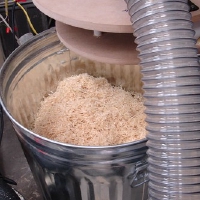 It didn’t take long for me to get the first of the shop projects done. This one was a Thien cyclone dust separator - sort of a scaled-up version of the cyclone technology in those expensive British vacuums. In the shop, I’ll be using it to separate out a good portion of the sawdust and wood shavings before it reaches the vacuum and clogs it. Since I built mine on a 30-gallon steel trash can, it can hold quite a bit more stuff than my shop vac.
 -
Setting up shop - a new series
Apr 26, 2011
-
2 min read
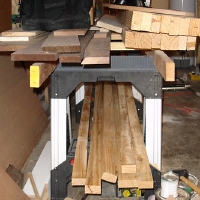 Recently, it’s become apparent to me that this woodworking thing is turning into a genuine hobby. And with that comes the realization that I need to get serious about my shop space. What I have now is a haphazard mess that was piled together to build some bathroom cabinets; what I need is something far more orderly and functional. Pardon the mess, I’m “rearranging” My tool collection is centered around Festool handheld power tools, which works for me (though not always for my wallet).
 -
The final countdown
Apr 7, 2011
-
2 min read
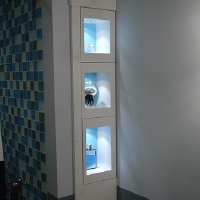 It’s taken a while, but we’ve finally made it: all of the major work on the bathroom is done! The only things remaining are minor tasks like touching up nail holes, paint, etc. Everything else is D-O-N-E! So without further ado, I give you the view from the doorway… Before and After Quite a dramatic difference, if I do say so myself. And off to the right in the “after” photo is the reveal of what I’ve been working on for quite a while… the last of the built-ins.
 -
A cantilever Christmas
Mar 7, 2011
-
7 min read
 It started simply enough last September. My brother and I made a surreptitious visit to our parents' house in preparation for Christmas. The idea was to build a simple set of shelves to use some otherwise useless space in their kitchen. Our parents had looked in the past for shelves that would fit, and came up empty-handed. With my recent interest in woodworking (and significant investment in Festools), we thought some custom shelves would be a perfect gift.
 -
Brass hole
Jan 11, 2011
-
7 min read
 While installing the cupboard latches for the built-ins, I have so far snapped off three screw heads. The first two times were during the dry assembly, before everything was painted or in place, so it wasn’t a big ordeal. This most recent time, however, was after the face frame had been secured in place. Luckily, the experience from the first two times made it easier to come up with a strategy…

atomicmike
Former software engineer, future physician. Devout turophile.